Free extension for Google Chrome

Read any Arabic page with full harakat and the meaning of every word

Rest the pointer on an Arabic word. Focus Arabic shows it fully vocalized, with what it means in that sentence. Click once to see the whole sentence vocalized and translated.

See how it works Coming soon to the Chrome Web Store
  • Meaning in context, not a dictionary list
  • Works on any website
  • No account, no ads, no tracking
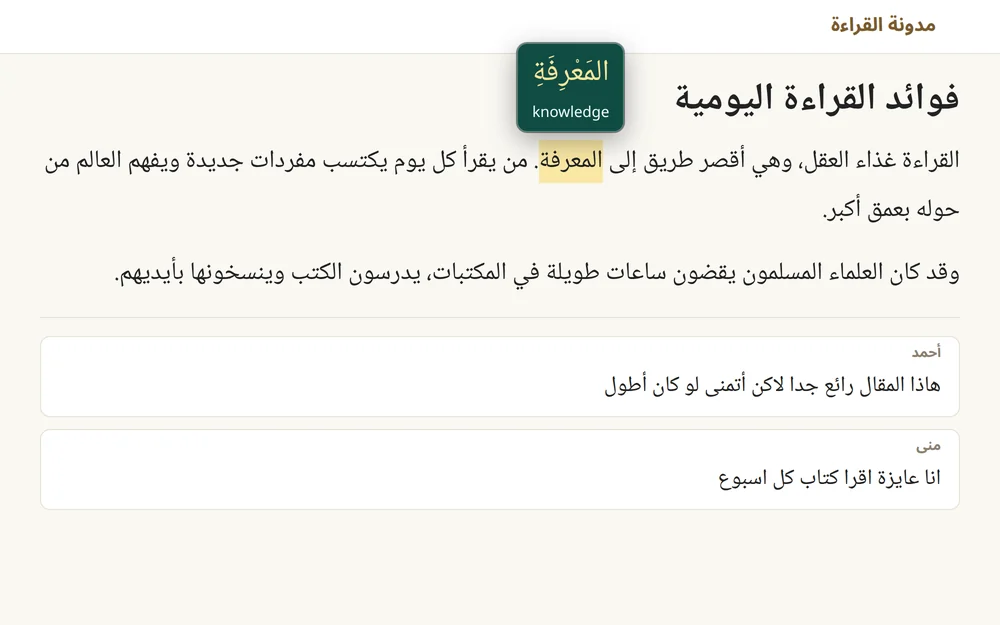
An Arabic blog post in Chrome. The pointer rests on the word المعرفة, which is highlighted, and a tooltip above it shows it with harakat, اَلْمَعْرِفَةِ, and its meaning, knowledge.

How it works

No copying text into a translator, no switching tabs. You read the page, and the help appears where you are looking.

  1. Add your free Gemini key

    Focus Arabic uses Google Gemini with your own API key. Creating one takes a minute and is free. See how.

  2. Rest the pointer on a word

    The word is highlighted, and a tooltip shows it with harakat and its meaning in that sentence. The first word of a sentence usually takes a second or two; the rest of the sentence is instant.

  3. Click to switch

    Click any Arabic word to switch between Word and Sentence. Links, buttons and text fields keep working as usual.

Made for reading real Arabic

News, articles, social posts and comments: Focus Arabic works on the Arabic you actually meet online, not only on textbook sentences.

Word mode

Every word with its harakat and its meaning in context

The same Arabic letters can be read and understood in several ways. Focus Arabic gives the vowel marks (tashkeel) and the meaning the word has in the sentence you are reading, not a list of every dictionary sense.

  • Full harakat (tashkeel) on the word you hover
  • Text that already has harakat, such as Quran verses, keeps its own
  • The page itself is never changed, so nothing shifts while you read
Word mode: the hovered word المعرفة shown with full harakat and the meaning knowledge.
Sentence mode

Or the whole sentence, vocalized and translated

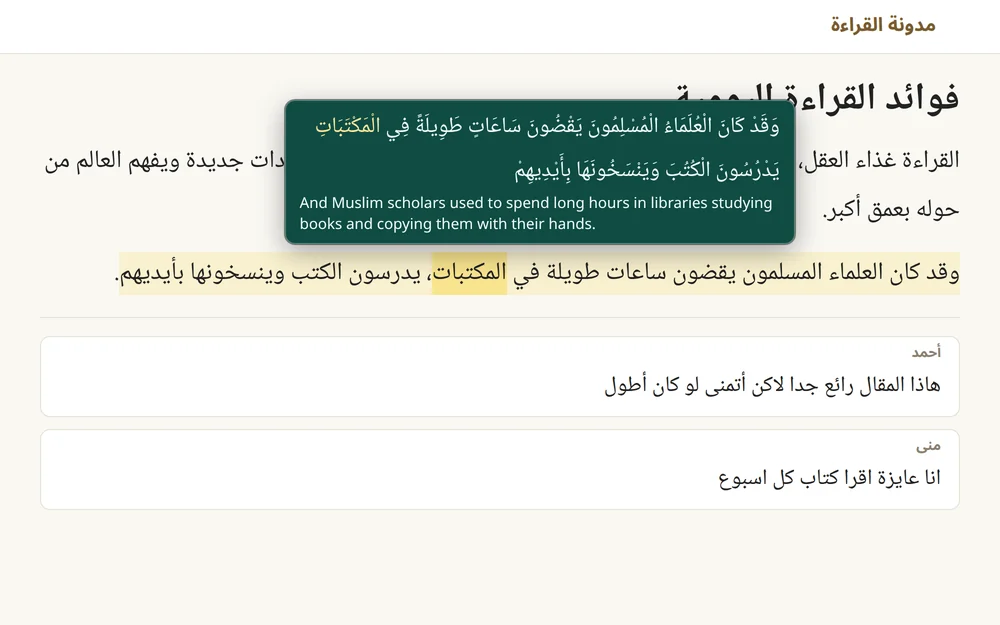
Click an Arabic word to switch to Sentence mode. The tooltip shows the full sentence with harakat, the word under the pointer in gold, and an English translation. The sentence is highlighted on the page, and the tooltip stays while you move across it.

Sentence mode: a highlighted Arabic sentence about Muslim scholars in libraries, shown above with full harakat and its English translation.
Typos and dialects

Handles misspellings and colloquial Arabic

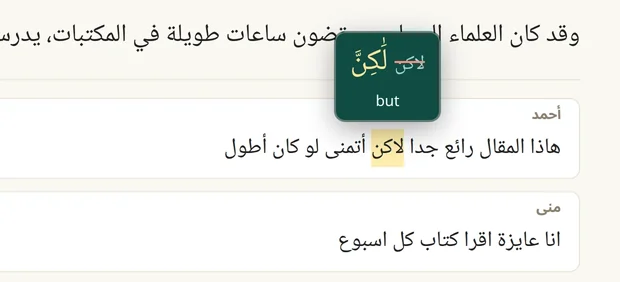
Comments and posts are full of spelling slips and dialect. A misspelled word is shown corrected, with harakat, next to the original struck out, with the meaning of the word the writer intended. Colloquial words are vocalized the way they are spoken, without forcing Fusha case endings on them.

A comment with the misspelled word لاكن. The tooltip shows the corrected لَكِنَّ, meaning but, next to the original struck out.
A misspelling, corrected: لاكن is shown as لَكِنَّ, "but".
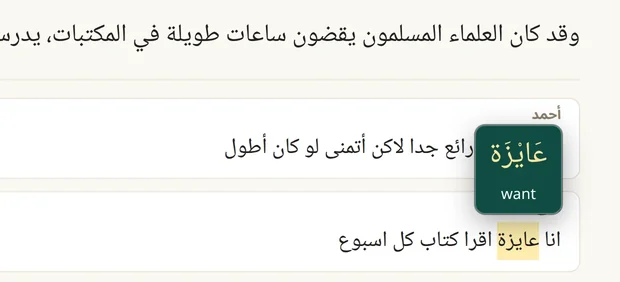
A comment in Egyptian Arabic. The dialect word عايزة is shown as عَايْزَة, meaning want.
Egyptian dialect, as spoken: عايزة is shown as عَايْزَة, "want".
Saved sentences

Every sentence you read, saved and searchable

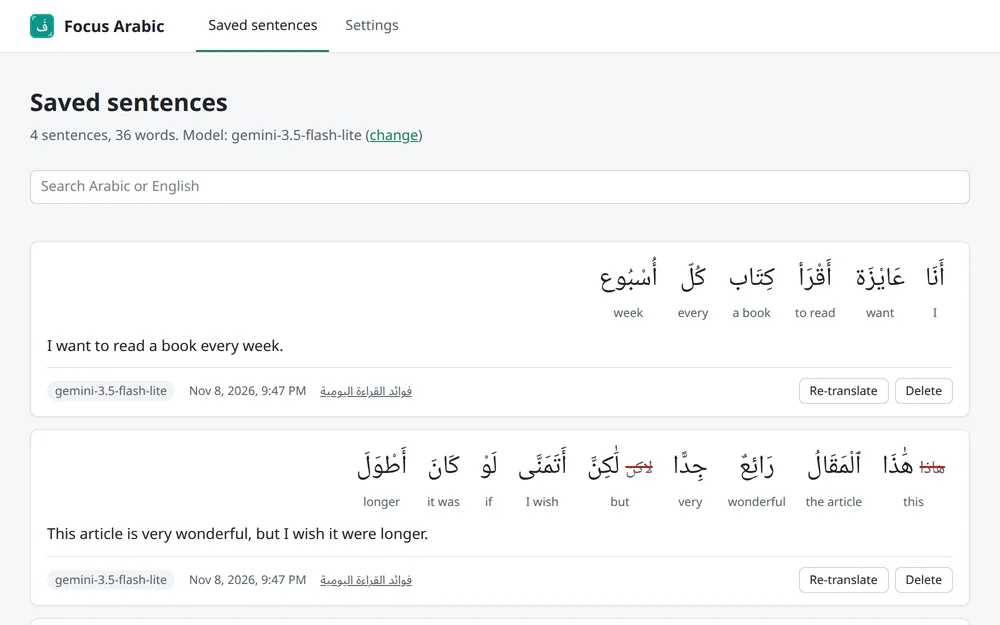
Each sentence is looked up once and kept in your browser, so hovering it again is instant and sends nothing. The dashboard lists every sentence word by word with its translation and a link back to the page where you read it.

  • Search in Arabic, with or without harakat, or in English
  • Switch to a stronger Gemini model and re-translate older sentences
  • Export a backup file and import it on another computer
The Focus Arabic dashboard listing saved sentences word by word, each word with harakat and its meaning, with a search box above.
You decide where

Off for any site with one switch

The switch in the toolbar button turns Focus Arabic off for the site you are on, its subdomains, and anything embedded in its pages. Settings turns it off everywhere and keeps the list of sites you turned off. While it is off, nothing is shown and nothing is sent.

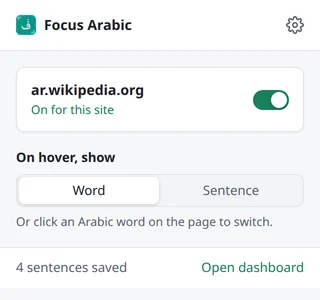
The Focus Arabic toolbar popup: ar.wikipedia.org with an on switch, and a choice between Word and Sentence.

Your reading stays yours

Only the sentence you hover

The Arabic words of that sentence, at most 30, go straight from your browser to Google's Gemini API with your own key. Not the page address, its title, or any other text on the page.

No server, no account, no tracking

Focus Arabic has no server of its own, so Gkernel never receives what you read. There are no analytics and no ads. Saved sentences stay in your browser.

Good to know about the free tier

On Gemini's free tier, Google may use what you send to improve its products, and people may review it. Do not hover text you would not want sent to Google.

Read the privacy policy

Questions

Is Focus Arabic free?

Yes. The extension is free, with no ads and no paid tier. It uses your own Gemini API key, and Gemini has a free tier with limits that Google sets. If you move your key to Google's paid tier, Google bills you for what you use.

Why do I need my own Gemini API key?

Focus Arabic has no server. Your browser asks Gemini directly with your key, so what you read passes through no one else, and there is no subscription to pay. Getting a key takes about a minute: here is how.

What does "meaning in context" mean?

Arabic words often have several meanings, and the harakat change with the word's role in the sentence. Focus Arabic sends the whole sentence, so the harakat and the meaning you see fit the sentence you are reading.

Which language are the meanings in?

English. Word meanings and sentence translations are both in English.

Does it work on Quran and hadith websites?

Yes. Where the page already shows harakat, Focus Arabic keeps the page's own harakat and adds the meaning.

Does it work in PDF files?

No. It works on web pages, including text inside frames embedded in a page.

How fast is it?

The first word you hover in a sentence usually takes a second or two while Gemini answers. Every other word in that sentence then appears at once, and sentences you have read before are instant, because they are saved.

Which Gemini model does it use?

gemini-3.5-flash-lite by default, chosen for speed. You can enter another Gemini model in Settings, then re-translate your saved sentences with it from the dashboard.

How do I turn it off?

Click the Focus Arabic button in Chrome's toolbar and turn off the switch for the site you are on. To turn it off everywhere, open Settings with the gear in the same window.

Read your next Arabic page with confidence

Focus Arabic is coming soon to the Chrome Web Store. Get your free Gemini key ready in the meantime.

Get a free Gemini key